ChatPDF Literature Review: Analyze 20 Papers in 1 Hour
Master a 4-stage ChatPDF literature review workflow to triage abstracts, extract methods and limitations, build a synthesis matrix, and verify exact page quotes before citing.
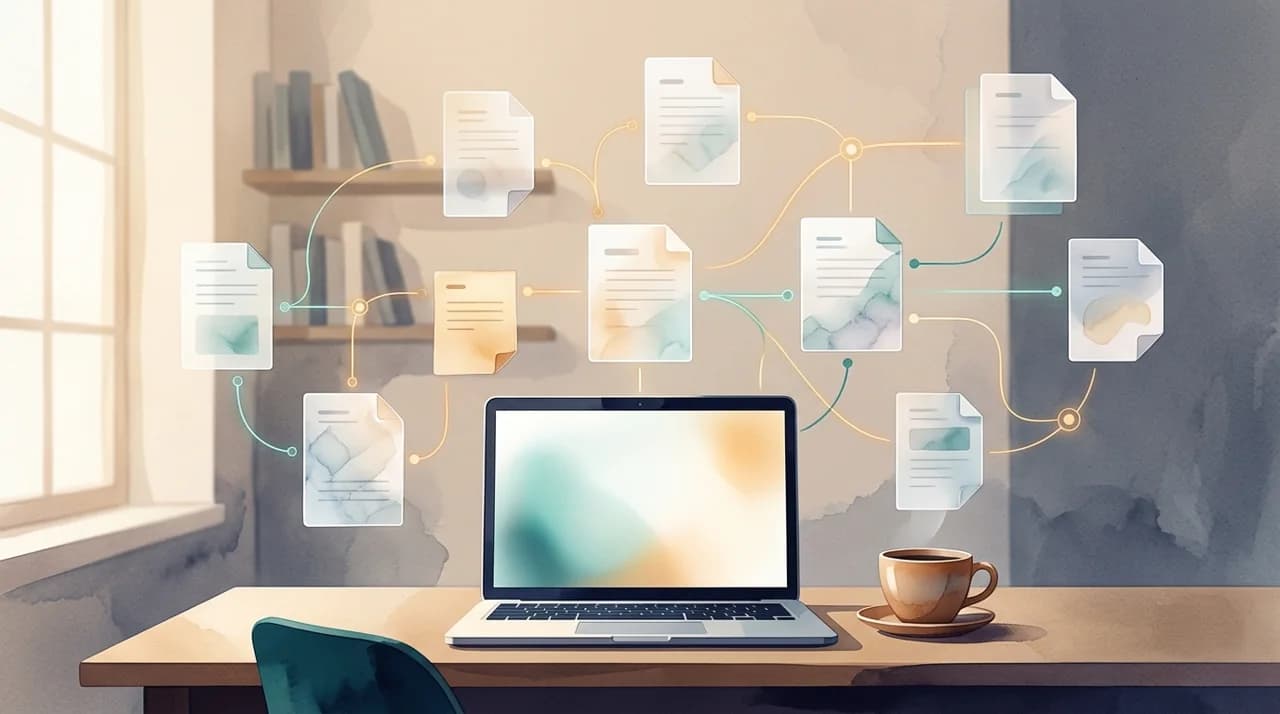
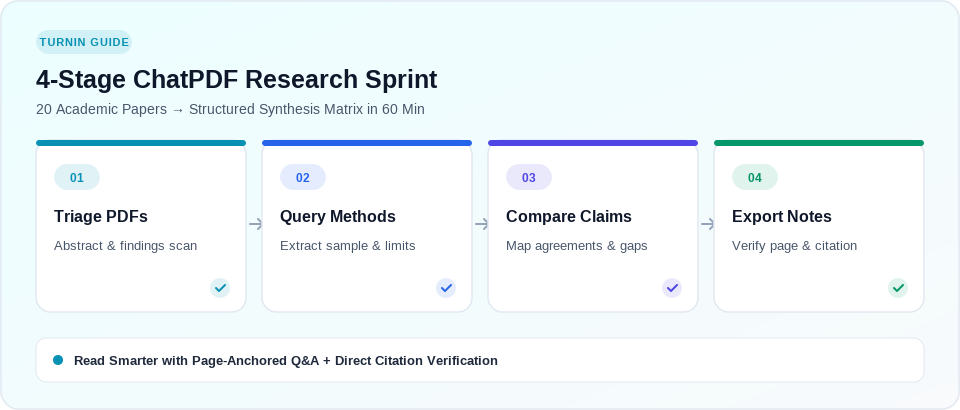
Key Takeaways: You don't need to read 20 research PDFs line by line to write a rigorous literature review. By splitting one hour into a 4-stage sprint—triage abstracts (10 min), interrogate PDFs for methods and sample sizes (20 min), fill a structured synthesis matrix (15 min), and verify exact page quotes and BibTeX records (15 min)—you can map a body of research accurately while keeping every citation grounded in the original source.
Sitting at your desk with 20 downloaded PDFs named 1-s2.0-S0140...pdf is one of the quickest ways to burn an entire weekend. Most students open paper #1, read the introduction carefully, highlight half of page four, and three hours later realize they've only finished four articles—and forgotten which study tested college undergraduates versus hospital patients.
Strong researchers don't read every word of every paper on a first pass. Instead, they use structured interrogation: deciding which papers earn deep reading, extracting comparable data points across studies, and verifying every claim directly against the source page before drafting a single sentence.
Why Linear PDF Reading Fails—and How the 1-Hour Sprint Works
When you read 20 papers sequentially without a shared framework, your notes turn into 20 disconnected mini-summaries. You end up knowing what each author said in isolation, yet struggling to see where findings converge, contradict, or leave a research gap.
A 60-minute ChatPDF workflow flips that habit by keeping you in the driver's seat:
- Minutes 0–10 (Abstract & Figure Triage): Sort all 20 PDFs into *Core*, *Supporting*, or *Out of Scope* before asking a single AI prompt.
- Minutes 10–30 (Structured PDF Q&A): Query the surviving 10–14 core papers with uniform methodological prompts—never open-ended "summarize this" requests.
- Minutes 30–45 (Literature Comparison Matrix): Drop extracted sample sizes, designs, findings, and limitations side by side so patterns jump off the page.
- Minutes 45–60 (Exact Page & BibTeX Verification): Open the cited PDF pages yourself, confirm verbatim quotes and statistics, and lock clean reference metadata.
Stages 1 & 2: Triage Abstracts and Interrogate Methods in 30 Minutes
Start with a fast manual triage. Skim only the title, abstract, final figure/table, and conclusion paragraph of each PDF. In 10 minutes, you can usually eliminate 5 to 8 off-topic papers—for example, animal studies when your review covers human clinical trials, or pre-2018 papers superseded by newer meta-analyses.
Next, upload your shortlisted PDFs into the Turnin Chat with PDF workspace. The secret to accurate extraction isn't asking for a summary; it's forcing the tool to answer a standardized research checklist and cite page numbers for every answer.
Before vs. After: Prompts and Literature Synthesis
Compare how a vague prompt leads to shallow prose, while a targeted prompt feeds real scholarly synthesis:
- Before (Weak Prompt — produces generic fluff):
*"Summarize this paper and tell me the main takeaways."* *Typical unusable result:* "This paper explores remote work productivity and highlights both benefits and challenges for employees across industries."
- After (Targeted Writing-Center Prompt — extracts comparable evidence):
*"Extract the exact sample size (N), participant population, research design, primary quantitative or qualitative finding, and author-stated limitations. Cite the exact PDF page number for each item, and quote any key statistical outcome verbatim."*
That precision immediately upgrades your writing:
- Before (Summary Dump):
"Alvarez (2023) studied remote software engineers and found productivity stayed high. Kim (2024) studied call-center staff and found output dropped."
- After (Analytical Synthesis):
"Remote-work productivity effects appear highly task-dependent: while Alvarez (2023, p. 114) observed sustained output among autonomous software engineers (*N* = 412), Kim (2024, p. 29) documented a 14% productivity decline in monitored call-center cohorts (*N* = 890), attributing the gap to onboarding friction."
Stages 3 & 4: Build a Synthesis Matrix and Verify Exact Page Quotes
Once your PDF Q&A outputs are ready, spend 15 minutes organizing them into a Literature Comparison Matrix. Keeping columns identical across every paper stops you from cherry-picking convenient quotes and exposes methodological gaps right away.
| Study (Year) | Sample & Method | Core Finding | Author-Stated Limitation | Verified Page Ref |
|---|---|---|---|---|
| Alvarez (2023) | *N* = 412 software engineers; 12-month longitudinal log analysis | Output unchanged; asynchronous code reviews rose 18% | Self-selected hybrid tech firms; no control for seniority | pp. 112–115 |
| Kim (2024) | *N* = 890 call-center agents; randomized shift assignment | 14% drop in calls resolved per hour among remote hires | Short 8-week window; high baseline turnover | pp. 27–30 |
| Patel & Okafor (2024) | *N* = 64 managers; semi-structured thematic interviews | Cross-team mentoring declined without scheduled office days | Qualitative perception data only; single UK region | pp. 402–406 |
| Nguyen et al. (2025) | *k* = 28 studies (*N* = 14,300); random-effects meta-analysis | Pooled productivity effect near zero (*d* = 0.03) with high heterogeneity | Publication bias toward large corporate datasets | pp. 8–11 |
Never skip Stage 4 (Minutes 45–60): Verification. AI PDF readers can occasionally misread a two-column table, mix up an unadjusted regression number with a final model, or pull a number from a cited prior study instead of the authors' own experiment. Click directly to the referenced page inside your PDF, read the surrounding paragraph yourself, and confirm every number before citing.
As you verify each source, save its clean .bib or RIS entry in your Turnin Literature Library and run your reference list through the citation verification and formatting tool so DOIs, author initials, and APA/IEEE italics stay consistent. When you are ready to draft from your matrix, you can move your verified outline straight into Turnin Academic Writing Studio rather than copying raw AI chat snippets.

5-Step Actionable Checklist for a 1-Hour PDF Synthesis Sprint
Keep this timer-backed checklist beside your screen during your next research session:
- Set a hard 10-minute triage timer: Read only abstracts, headings, and key tables to cut 20 PDFs down to the 10–14 studies that truly answer your research question.
- Run one standardized extraction prompt per paper: Ask for sample size, population, method, headline finding, limitation, and exact page numbers—never generic summaries.
- Populate a 5-column synthesis matrix: Group studies by theme or contradiction rather than listing them alphabetically in your notes.
- Spot-check every statistic and quote on the source PDF page: Confirm that the claim belongs to the paper's authors (not a secondary citation in their Introduction) and capture exact page numbers for quotes.
- Lock verified citations and write in your own analytical voice: Export clean BibTeX/APA entries, never paste AI-generated summaries directly into your manuscript, and remember that Turnin is an independent research workflow platform—your university's AI disclosure rules and official academic evaluation system always prevail.
Frequently Asked Questions About ChatPDF Literature Reviews
Can ChatPDF hallucinate sample sizes or p-values from dense PDFs?
Yes, especially with multi-column layouts, rotated landscape tables, or scanned older articles. That is why every prompt should demand an exact page number, and why Stage 4 requires opening that page yourself to verify numbers before citing.
How do I avoid accidental plagiarism when using AI to summarize papers?
Never copy AI-generated PDF summaries into your draft. Use AI only to locate facts and structure your comparison matrix, then write every paragraph of your literature review from the matrix in your own voice—linking studies by agreement, contrast, and limitation.
Should I cite the AI tool or only the original research papers?
In your bibliography, you cite the original peer-reviewed papers you verified—never ChatPDF as an academic source. However, if your university syllabus requires an AI-use statement for literature screening or organization, disclose your workflow transparently according to your instructor's guidelines.