Find Peer-Reviewed Papers & Export Clean BibTeX/RIS Fast
Master Boolean literature searches, Open Access filters, and DOI verification to eliminate ghost citations. Export clean BibTeX and RIS files straight into Zotero or Overleaf.

Key Takeaways: Typing full questions into a search bar buries high-quality studies under thousands of irrelevant hits. Combining Boolean operators with Open Access and citation filters, verifying every DOI to eliminate AI "ghost" citations, and exporting standardized.bibor.risfiles cuts literature review prep time in half.
A strong literature review begins long before you write your first paragraph—it starts with how cleanly you query academic databases and manage bibliographic metadata. Too many students waste weekends scrolling past paywalled preprints, citing outdated blog summaries, or debugging broken LaTeX bibliographies caused by mangled .bib entries. Worse still, relying on unverified AI-generated reading lists can slip fabricated "ghost" citations into your draft, putting your academic standing at serious risk.
Building Precision Queries with Boolean Search Operators
Search engines reward structure, not conversational English. When you type a full sentence like *"how does AI tutoring affect ESL college writing"*, databases match scattered keywords across unrelated abstracts. Instead, group synonyms with OR, link distinct concepts with AND, exclude noise with NOT (or -), and lock exact multi-word terms inside quotation marks.
Look at how a targeted Boolean string transforms search precision:
- Before (Too Broad — 18,400+ results):
AI feedback university students writing - After (Targeted — ~85 peer-reviewed results):
("generative AI" OR "automated writing evaluation") AND ("academic writing" OR "ESL") AND ("higher education" OR university) NOT "K-12"
Use parentheses carefully: everything inside (A OR B) is evaluated as one concept block before AND connects it to the next block. You can build and refine these multi-concept queries directly inside Turnin's academic literature search library to surface peer-reviewed journals without manual syntax guesswork.
Filtering High-Impact Open Access Studies and Verifying DOIs
Once your Boolean query returns a focused pool of 50 to 150 papers, apply three filters before downloading anything:
- Peer-Reviewed Journal Status: Exclude unrefereed blog posts, slide decks, and non-peer-reviewed student theses unless your supervisor explicitly permits grey literature.
- Publication Window + Citation Velocity: For fast-moving fields (AI, public health, digital policy), filter to the last 3–5 years, while keeping 3–5 older foundational studies with 100+ citations as theoretical anchors. For newer papers (under 18 months old), prioritize journal impact and methodology quality over raw citation count.
- Open Access Availability: Toggle Open Access filters first so you can immediately read full-text PDFs rather than relying on truncated abstracts behind paywalls.
Spotting Hallucinated and Ghost Citations
If you ever brainstormed references using a general chatbot—or copied a secondary citation from another paper—verify every single entry before adding it to your bibliography. Ghost citations look deceptively real: authentic author names paired with plausible journal titles that never actually existed.
| Verification Check | What a Broken / Ghost Entry Looks Like | How to Verify in 30 Seconds | Action to Take |
|---|---|---|---|
| DOI Resolution | 10.1016/j.compedu.2024.999999 returns a 404 error | Paste the DOI into https://doi.org/ or Crossref metadata search | Delete immediately if unresolved; search by exact title |
| Author-Title Mismatch | Real scholar listed on a paper outside their discipline | Check the author's ORCID or Google Scholar profile | Replace with the genuine article metadata |
| Journal Volume/Year Sync | Volume 42 listed under 2025 when Vol. 42 ran in 2019 | Confirm issue number and pagination on the publisher's landing page | Pull clean metadata directly from the publisher or DOI |
| Preprint vs. Final Paper | arXiv preprint cited despite later peer-reviewed publication | Search the title to see if a journal version appeared later | Cite the peer-reviewed journal version with its official DOI |
| Retracted Status | High-citation study later withdrawn for data errors | Check Crossref/Retraction Watch badge on the article page | Remove from supporting evidence or explicitly note retraction |
Inspecting Full Texts and Extracting Accurate Evidence
Finding a legitimate PDF is only half the job—misreading a study's scope is one of the fastest ways to lose marks. Never cite a paper based solely on its abstract. Abstracts state headline conclusions while burying crucial caveats—such as small pilot sample sizes (*n* < 30), correlation-only designs, or specific demographic limits—inside Section 3 or Section 4.
Adopt a three-pass reading habit: read the title, abstract, and headings first (3 minutes); inspect all tables, figures, and sample descriptions second (7 minutes); and read the methodology and discussion caveats closely before taking notes. When you are screening twenty candidate PDFs for a systematic review, tools like interactive PDF literature analysis can help you locate exact sample parameters, variables, and limitations rapidly. Keep a strict academic integrity boundary in mind: always verify every extracted quote, statistic, and claim directly against the original PDF page before citing it, because your university's citation and academic integrity rules always govern your final paper.
Exporting Clean BibTeX and RIS Into Zotero and Overleaf
Manually typing references invites punctuation errors, missing page numbers, and inconsistent author initials. Instead, export standardized metadata files directly from verified records: use `.bib` (BibTeX/BibLaTeX) if you write in LaTeX or Overleaf, and `.ris` if you manage sources in Zotero, EndNote, or Mendeley.
Even automated exports need a quick sanity check, especially in BibTeX. Notice how missing curly braces silently break capitalization in LaTeX bibliographies:
- Before (Broken BibTeX):
title = {Effects of AI feedback on ESL writing in UK universities},(renders as *"Effects of ai feedback on esl writing in uk universities"* in many styles) - After (Clean BibTeX):
title = {Effects of {AI} Feedback on {ESL} Writing in {UK} Universities},(preserves uppercase acronyms accurately and includesdoi = {10.xxxx/xxxxx})
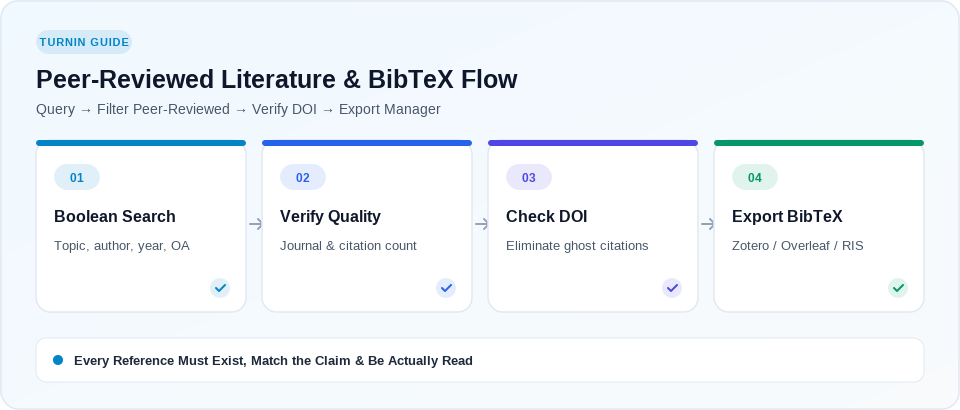
Follow this five-step workflow to move cleanly from search query to verified bibliography:
- Run Structured Boolean Searches. Start inside Turnin's literature library using grouped
ORsynonyms andANDconcept blocks, filtering for peer-reviewed Open Access studies. - Verify Every DOI Before Saving. Confirm that each candidate paper resolves cleanly to a real publisher page with matching authors, year, and pagination.
- Screen Full-Text PDFs for Methods and Caveats. Use PDF literature Q&A to pinpoint sample sizes and limitations, then confirm exact page numbers inside the PDF itself.
- Export `.bib` or `.ris` in Batch. Import
.risinto Zotero (*File > Import*) for Word/Google Docs plugins, or upload.bibdirectly into your Overleaf project folder and link it via\bibliography{references}. - Normalize Styles Before Final Submission. Run your final reference list through a citation formatting and verification tool to ensure consistent APA 7, MLA 9, Chicago, or IEEE punctuation across every entry, remembering that your department's official style sheet always takes priority.
Frequently Asked Questions About Literature Search and Citations
Should I export references as BibTeX or RIS?
Choose BibTeX (`.bib`) if you are writing in LaTeX or Overleaf, as it integrates natively with \cite{} keys and BibLaTeX styles. Choose RIS (`.ris`) if you work in Microsoft Word or Google Docs via Zotero, EndNote, or Mendeley, since RIS preserves structured metadata cleanly across desktop reference managers.
How many citations make a study "high-impact" in a literature search?
There is no single threshold across disciplines. In fast-moving computer science or biomedical fields, a paper published two years ago with 30–50+ citations is already influential, whereas in humanities or specialized education subfields, 15–25 citations may signal a major contribution. Always weigh citation count alongside publication recency and journal rigor.
How can I make sure AI tools haven't slipped a ghost citation into my bibliography?
Never paste AI-suggested references directly into your reference list. Resolve every paper's DOI on doi.org, confirm that the author list, journal volume, and page range match the publisher's official record, and download the full-text PDF yourself before writing a single in-text citation.