Repository vs. Non-Repository Checks: Avoid 100% Self-Plagiarism
Understand how repository indexing causes accidental 99%–100% self-plagiarism matches, and learn how to run non-repository pre-checks safely before submitting.
Key Takeaways: Uploading a draft to any standard-repository submission folder writes your full manuscript into a permanent paper database—causing your real deadline upload to return a 95%–100% self-match. Before pre-checking any essay, verify that the workflow runs in strict non-repository (no-store) mode with clear data-deletion protections.
The 99% Self-Match Trap: How Students Flag Their Own Essays
Few moments in university life spike adrenaline faster than submitting an original essay ten minutes before midnight, refreshing your LMS page, and seeing a 99% similarity badge linked to *"Submitted to University Student Paper Repository."* You didn't copy a classmate or buy an essay. You accidentally collided with your own earlier draft.
Almost every case of accidental self-plagiarism happens the same way. A conscientious student wants to verify citations before the deadline, so they test their draft inside another course's open assignment link, ask a friend at another university to upload it, or paste it into a questionable "free plagiarism checker" online. Whenever that upload hits a standard repository, the system permanently indexes the text—meaning your real submission hours later looks like a verbatim copy of an existing student paper.
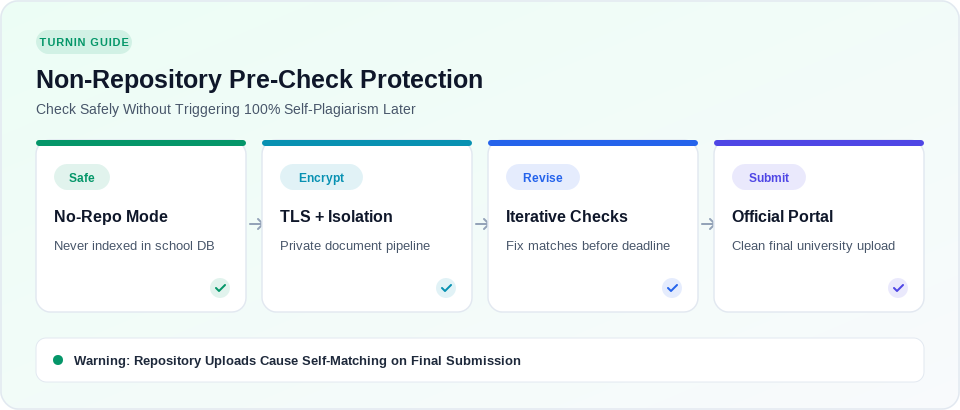
Repository vs. Non-Repository Indexing Explained
Similarity engines compare your uploaded document against three primary corpora: live and archived web pages, published academic journals and books, and the student paper repository. That third bucket is where repository settings make all the difference.
- Standard Repository Mode: Your file is scanned *and permanently stored* inside the institution's or global student database. Future submissions—including your own revised final draft—will match against that stored copy. Instructors deliberately enable this mode on final graded assignments so cohorts cannot recycle prior essays.
- Non-Repository (No-Store) Mode: Your manuscript is compared ephemerally against web pages, publications, and existing repositories to generate a diagnostic report, then never added to the student paper index.
Risky vs. Safe Pre-Check Workflow:
Risky (Repository Collision): Student uploadsCapstone_Draft_v3.docxto a misconfigured sandbox folder with standard repository indexing enabled. Three days later, uploadingCapstone_Final.docxto the official grading portal returns a 96% match to the earlier student submission, triggering an academic-misconduct review delay. Safe (Non-Repository Pre-Check): Student verifies non-repository handling and runsCapstone_Draft_v3.docxthrough a non-repository pre-submission check on Turnin. They fix two under-paraphrased paragraphs in the literature review, then submitCapstone_Final.docxto their university portal—recording a clean baseline score with zero self-match.
| Check Environment | Stores Full Paper in Index? | Self-Match Risk on Final Upload | Data Privacy & Control | Best Academic Use Case |
|---|---|---|---|---|
| University Final Portal (Standard Repo) | Yes — permanently indexed | Very High (90%–100%) if used early | Governed by university IT admin | Final graded submission only |
| Instructor Draft Slot (No Repository) | No (if correctly configured) | Low, unless instructor misconfigures | Managed by course instructor | Official milestone drafts when offered |
| Turnin Non-Repository Pre-Check | No — strict non-repository mode | None from the pre-check itself | Encrypted processing; user-controlled | Independent pre-check & citation audit |
| Unverified "Free" Essay Checkers | Unknown — often harvested/resold | High + severe leakage risk | Minimal or opaque retention policy | Avoid completely for academic work |
Reading Similarity Thresholds and Auditing Privacy Before Upload
Before uploading an unpublished thesis or journal paper anywhere, inspect the platform's privacy architecture rather than trusting a marketing badge. Check how reports are generated, whether files are excluded from shared repositories, and how long temporary artifacts remain accessible. Reviewing Turnin's privacy and trust commitments alongside an example Turnin sample similarity report lets you verify exactly what a diagnostic check inspects before you ever upload a page.
When your report arrives, interpret the percentage responsibly instead of treating any single number as a pass/fail verdict:
- 0%–14% (Typical Healthy Range): Usually reflects properly quoted definitions, standard methodology terms, or bibliography entries (when not excluded by filter settings). Always click through the highlighted lines anyway—one uncited 40-word paragraph still matters even inside a 6% report.
- 15%–25% (Targeted Revision Zone): Common in literature-heavy essays where several paraphrases stay too close to source sentence structure. Revisit those clusters, rewrite from your notes, and double-check quotation marks.
- 90%–100% Single-Source "Student Paper" Match: The unmistakable signature of a repository collision—almost always caused by uploading the same paper twice to repository-enabled folders or submitting an earlier assignment you wrote without instructor approval.
Above all, keep the academic integrity boundary clear: Turnin is an independent pre-check service designed to help you catch accidental patchwriting, missing quotation marks, or structural similarity so you can revise responsibly in your own words. It is not affiliated with official Turnitin, and your university's official submission portal, syllabus thresholds, and instructor judgment always prevail.
5-Step Safe Pre-Check Workflow Before Final Submission
Follow this five-step routine before every major coursework, capstone, or dissertation upload so you protect both your academic record and your manuscript privacy:
- Confirm non-repository status before uploading: Never test a draft inside another class's live dropbox or an unverified free tool. Use an explicit non-repository workflow such as the Turnin pre-submission check, and confirm privacy rules on the Turnin trust center.
- Inspect highlighted blocks, not just the headline percentage: Open the detailed breakdown—much like what you see in a Turnin sample report—to separate harmless reference-list matches from true body-text overlap.
- Revise close paraphrases from understanding: When three or more consecutive words mirror a source outside quotation marks, close the source PDF, restate the concept in fresh syntax, and keep the citation intact.
- Match your revision budget to your submission schedule: Run your check at least 24 hours before the deadline so you have time for thoughtful edits; check Turnin plan options in advance if you have multi-chapter thesis drafts to review.
- Submit once to your official university portal—and keep version history: Upload only your final verified file to your university's grading folder, and retain timestamped local drafts (Word/Google Docs history) in case an administrative check ever requires proof of authorship.
Frequently Asked Questions
Will running a non-repository check on Turnin cause a 100% match on my university's official Turnitin portal?
No—provided a check genuinely operates in non-repository mode, your manuscript is never added to the student paper index that institutional portals query. Your university's official system only sees what has been indexed in public web sources, academic publications, or prior repository submissions. Still, always remember that your university's official portal determines your final recorded report.
What should I do if I already uploaded my draft to a repository by mistake?
Do not panic or scramble to rewrite your entire paper overnight, which often hurts clarity and looks unnatural. Email your instructor or module leader immediately with your earlier timestamped draft files and explain which folder received the test upload. Only an institutional administrator at the organization that owns that repository upload can request permanent removal from the index.
Should I try to force my similarity score down to 0% before submitting?
No. A 0% similarity score is neither realistic nor expected in scholarly writing—especially when you cite established theories, legal statutes, or standard laboratory protocols. Focus on eliminating unquoted verbatim strings and close patchwriting, while leaving accurate citations and properly formatted quotations intact.