
Turnin vs Scribbr, Grammarly & QuillBot: Pre-Submission Guide
Compare Turnin, Scribbr, Grammarly, and QuillBot across similarity checks, AI detection, citations, and PDF tools so you can build one affordable pre-submission workflow.

TL;DR: Most students waste $50–$90 a month stitching together separate apps for grammar, paraphrasing, citations, PDF reading, and plagiarism checks. Pairing one unified pre-submission workspace like Turnin with your existing editor covers similarity and AI pre-checks, academic revision, citations, ChatPDF, and PDF utilities—while remembering that your university's official submission system always makes the final call.
Why Most Students Overpay for Disconnected Writing Apps
Walk into any university writing center two days before finals, and you will see the same browser tabs open on almost every laptop: Grammarly for commas, QuillBot for rewording stiff paragraphs, Scribbr for a one-off plagiarism scan, an AI PDF chat app to unpack a 40-page journal article, and a separate site just to merge appendices into one PDF. Individually, each tool looks helpful. Together, they create subscription bloat, broken copy-paste formatting, and blind spots right where academic integrity matters most.
The deeper problem is workflow fragmentation. A grammar checker cannot tell you that a paraphrased paragraph still mirrors an author's exact sentence skeleton, and a generic rephraser often distorts technical terminology until a biology or economics claim becomes inaccurate. Meanwhile, Turnin is built specifically as an independent pre-submission toolkit for students—not an official university Turnitin portal—so you can audit similarity, inspect AI-style patterns, read literature, format citations, and tidy PDFs in one place before uploading your final file to your LMS.
Side-by-Side Feature Comparison: Turnin, Scribbr, Grammarly, and QuillBot
When comparing academic tools, feature checklists on marketing pages rarely reflect how students actually revise a paper at midnight. The table below compares Turnin, Scribbr, Grammarly, and QuillBot across the six capabilities that matter between your first literature search and final upload.
| Capability | Turnin | Scribbr | Grammarly | QuillBot |
|---|---|---|---|---|
| Similarity & AI Pre-Check | Integrated similarity and AI pattern pre-check reports | Paid per-paper plagiarism check (Turnitin-powered partner scan) | Basic web plagiarism check on paid tiers; limited AI check | Basic plagiarism check on Premium; limited AI detector |
| Academic Revision & Tone | Academic-aware phrasing and natural flow refinement | Human proofreading service (paid per word) | Real-time grammar, mechanics, and clarity suggestions | Fast synonym-based paraphraser and sentence modes |
| Citation & Reference Formatting | Built-in multi-style academic citation generator | Free citation generator + expert citation guides | Basic auto-citations on select web sources | Basic built-in citation generator |
| Literature Search & ChatPDF | Integrated academic paper search and ChatPDF Q&A | Not offered | Not offered | Not offered |
| PDF & Submission Utilities | Merge, split, compress, and format conversion tools | Not offered | Not offered | Limited document export |
| Pricing Structure | Flexible pay-as-you-go or unified student plans | Pay-per-document pricing (can get costly for multiple drafts) | Monthly/annual subscription | Monthly/annual subscription |
Notice the trade-off: Scribbr shines if you want a human editor for a finished thesis, and Grammarly remains unbeatable for catching live typos inside Google Docs or Word. Neither, however, gives you an end-to-end research-to-submission workspace, and QuillBot's single-purpose paraphrasing model leaves you hunting elsewhere for literature reading and file formatting.
Where Each Tool Fits—and Breaks—in Real Coursework
To see why a single-purpose rephraser or grammar tool falls short on its own, consider a typical 2,500-word undergraduate literature review. Suppose you draft the following sentence based on two empirical studies:
- Draft before revision: *"Remote work significantly boosts employee autonomy, yet prolonged digital isolation frequently diminishes spontaneous team collaboration across distributed departments."*
- QuillBot-style synonym swap: *"Telecommuting substantially elevates worker self-governance, though extended virtual seclusion regularly reduces unprompted group cooperation throughout dispersed divisions."*
Grammarly would mark that second version grammatically clean. Yet any professor—or Turnitin reviewer—would immediately notice unnatural phrasing like *"worker self-governance"* and *"unprompted group cooperation"*. Replacing domain terms with awkward thesaurus substitutes is one of the fastest ways to trigger both grading deductions and elevated AI-pattern flags.
A stronger academic revision keeps precise terms intact while clarifying your analytical claim:
- Strong academic revision: *"Although remote work expands day-to-day autonomy, sustained reliance on asynchronous channels can erode informal collaboration across distributed teams (Smith, 2024)."*
Practical thresholds also keep revisions grounded. Most university instructors expect overall similarity below 15%–20% once bibliography entries, properly cited block quotes, and standard methodological phrases are excluded, and they pay close attention to single-source clusters above 3%–5% rather than isolated two-word overlaps. Likewise, an AI-indicator score should never prompt panic-rewriting of authentic human prose; instead, treat flagged passages as a signal to replace repetitive sentence templates with specific evidence from your sources.

A Lean 5-Step Pre-Submission Workflow That Saves Money
You do not need five overlapping subscriptions to submit confident, original work. Keep your existing word processor (and free Grammarly for basic spellcheck if you like), then run this five-step routine before every deadline:
- Preview what a real diagnostic looks like before writing final edits. Take two minutes to explore a Turnin sample report so you know how matched passages, excluded references, and flagged sections are visually separated—this prevents unnecessary edits to valid citations.
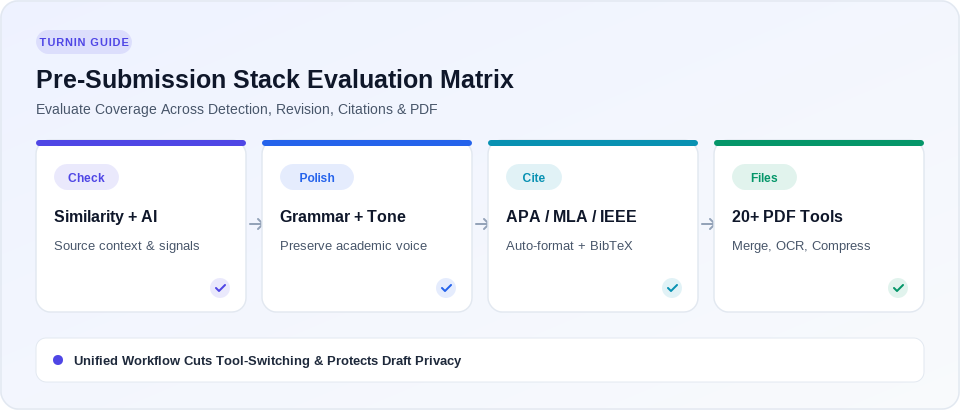
- Audit your complete draft for overlap and source attribution. Once your argument and bibliography are in place, run a Turnin similarity and AI pre-check to catch forgotten quotation marks, tight patchwriting, or multi-sentence clusters drawn from a single paper.
- Revise flagged passages with human clarity, not synonym swaps. Where sentences read overly formulaic or closely mirror a source's structure, use Turnin's ethical AI-pattern and flow refiner alongside your own voice—adding specific study data, dates, or analytical transitions so every claim reads like your own reasoning.
- Clean up formatting, references, and PDFs in one pass. Before uploading, use Turnin's academic PDF and paper tools to merge cover sheets, compress oversized figures, and verify that embedded text remains selectable rather than rasterized into images.
- Match your plan to your semester workload. If you only submit three major essays a term, avoid locking yourself into multiple recurring subscriptions; check Turnin's flexible student pricing so you only pay for the volume of checks and utilities your coursework actually requires.
Above all, keep the academic integrity boundary clear: pre-submission tools exist to help you spot accidental overlap, tighten citations, and polish original arguments responsibly. Turnin is an independent preparation aid, not your institution's official system, and your university's official Turnitin or LMS evaluation always governs final grading and compliance.
Frequently Asked Questions
Can Turnin replace Grammarly or Scribbr completely?
For pre-submission checks, citation generation, literature reading (ChatPDF), academic revision, and PDF utilities, Turnin consolidates what typically takes three or four separate apps. If you want live typo underlines while typing in Word, keeping Grammarly's free tier alongside Turnin is a smart, zero-cost pairing; if you need a human line-editor for a doctoral dissertation, Scribbr's human proofreading remains a distinct service.
Is a Turnin pre-check identical to my university's official Turnitin report?
No independent pre-check is identical to an institution's internal Turnitin database, because university portals index private student paper repositories and course-specific exclusion rules set by your instructor. Use Turnin to catch web, journal, and structural overlap early, while remembering that your university's official system always prevails at submission.
Should I pay for QuillBot just to lower a similarity or AI score?
No. Using an automated spinner to swap words out of context frequently damages academic accuracy, introduces unnatural phrasing, and can make text read more—not less—synthetic. Focusing on genuine structural paraphrasing, accurate citations, and clear analytical voice is far more effective and aligns with university integrity standards.